


Enter all the desired criteria: the apps that satisfy them all will be searched; if a criterion is specified multiple times, only the last occurrence will be considered.


























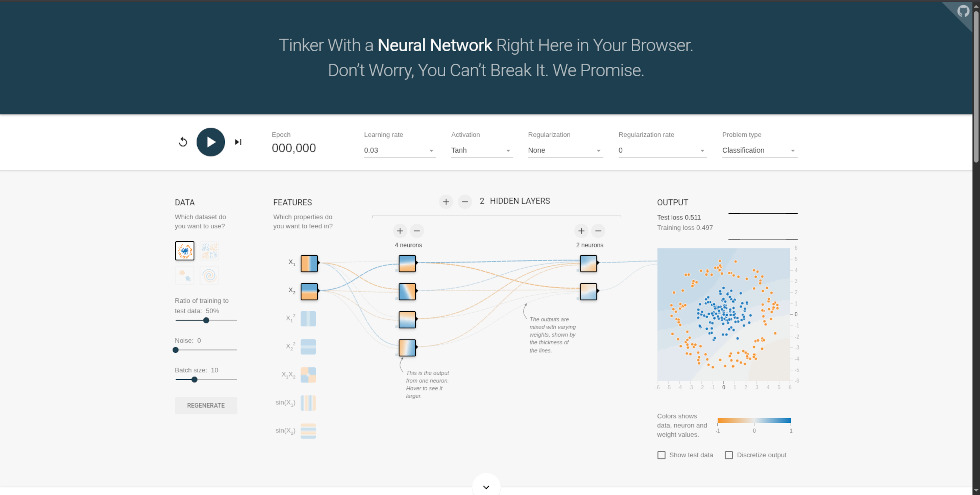
This is the initial screen of TensorFlow Playground and represents the main workspace. At the center, the structure of the neural network is displayed, which can be modified by adding or removing hidden layers and neurons using the “+” and “−” buttons. On the left, there are options to select the dataset, choose input features, and configure data parameters such as the training/test split, noise level, and batch size. At the top, menus allow you to set the main hyperparameters, including the learning rate, activation function, regularization, and problem type (classification or regression). On the right, the output area displays the data distribution, the loss values computed on both training and test sets, and a graph showing their progression during training. Finally, the playback controls allow you to start, pause, or reset the training process, as well as monitor the number of training epochs.
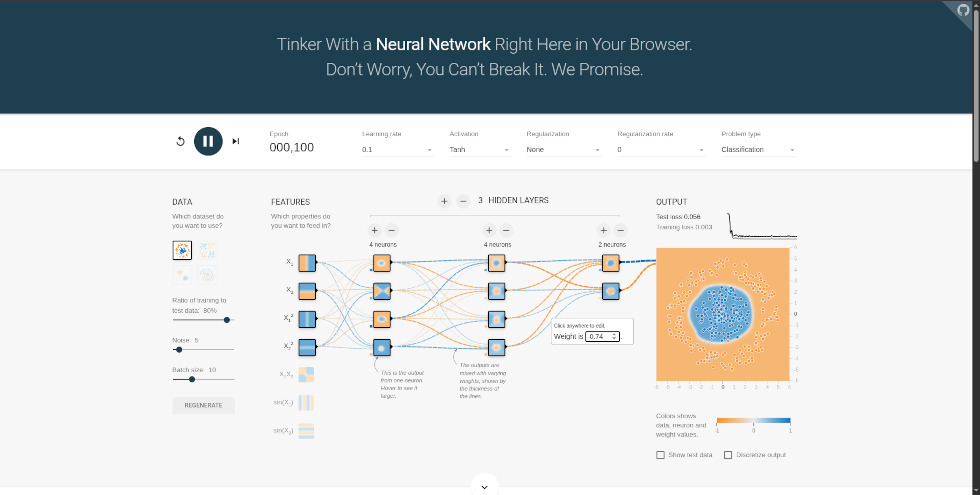
In this view, the neural network is actively training, and the epoch counter increases as the model learns; the process can be paused or reset at any time. At the center, the network structure is displayed, and each neuron visualizes its behavior: hovering over a node reveals its contribution to the output, shown in the panel on the right. The model is a fully connected (dense) network—the only architecture available in the Playground—where each neuron is connected to all neurons in the next layer. The connections represent weights and are encoded visually: color indicates the sign (blue for positive, orange for negative), while thickness reflects their magnitude. By interacting with these connections, you can inspect their values and even adjust them manually, immediately observing the effect on the model. In the output area, along with the data distribution, the decision boundary updates in real time as a colored region separating the classes, illustrating how the network learns to classify data or approximate the target function during training.
TensorFlow Playground can be used in educational contexts to:
 0/5
5
0/5
5
0/5
5
0/5
5
0/5
5
0/5
5
0/5
5
0/5
5
0/5
5
0/5
5
 Add comment









Copy link